Wednesday, 27 July 2016

PASS OBJECT AS PARAMETER

PASS OBJECT AS PARAMETER BY AAMIR JAMIL

OBJECTIVE

Study Pass Objects As Parameter To Methods and Constructors.

THEORY

In previous lab we have only been using simple types as parameters to methods. However, it is both correct and common to pass objects to methods. For example, consider the following short program:

// Objects may be passed to methods.

class Test {
int a, b;                            //made by aamirjamil
Test(int i, int j) {
a = i;
b = j;
}
// return true if o is equal to the invoking object
boolean equals(Test o) {
if(o.a == a && o.b == b) return true;
else return false;
}
}
class PassOb {
public static void main(String args[]) {
Test ob1 = new Test(100, 22);
Test ob2 = new Test(100, 22);
Test ob3 = new Test(2,1);
System.out.println("ob1 == ob2: " + ob1.equals(ob2));
System.out.println("ob1 == ob3: " + ob1.equals(ob3));
}
}
This program generates the following output:


As you can see, the equals( ) method inside Test compares two objects for equality
and returns the result. That is, it compares the invoking object with the one that it is
passed. If they contain the same values, then the method returns true. Otherwise,
it returns false. Notice that the parameter o in equals( ) specifies Test as its type.
Although Test is a class type created by the program, it is used in just the same way
as Java’s built-in types.

A Closer Look at Argument Passing

In general, there are two ways that a computer language can pass an argument to a subroutine. The first way is call-by-value, the second way an argument can be passed is call-by-reference.

Passed By Value

class Test {
void meth(int i, int j) {
i *= 2;                                                 //made by aamirjamil
j /= 2;
}
}
class CallByValue {
public static void main(String args[]) {
Test ob = new Test();
int a = 15, b = 20;
System.out.println("a and b before call: " +
a + " " + b);
ob.meth(a, b);
System.out.println("a and b after call: " +
a + " " + b);
}
}

The output from this program is shown here:
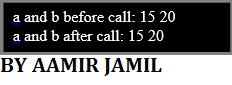


Passed By Reference

class Test {
int a, b;
Test(int i, int j) {
a = i;                                                  //made by aamirjamil
b = j;
}
// pass an object
void meth(Test o) {
o.a *= 2;
o.b /= 2;
}
}
class CallByRef {public static void main(String args[]) {
Test ob = new Test(15, 20);
System.out.println("ob.a and ob.b before call: " +
ob.a + " " + ob.b);
ob.meth(ob);
System.out.println("ob.a and ob.b after call: " +
ob.a + " " + ob.b);
}
}
This program generates the following output:


Returning Objects
A method can return any type of data, including class types that you create. For
example, in the following program, the incrByTen( ) method returns an object in
which the value of a is ten greater than it is in the invoking object.

// Returning an object.
class Test {
int a;                                                     //made by aamirjamil
Test(int i) {
a = i;
}
Test incrByTen() {
Test temp = new Test(a+10);
return temp;
}
}
class RetOb {
public static void main(String args[]) {
Test ob1 = new Test(2);
Test ob2;
ob2 = ob1.incrByTen();
System.out.println("ob1.a: " + ob1.a);
System.out.println("ob2.a: " + ob2.a);
ob2 = ob2.incrByTen();
System.out.println("ob2.a after second increase: "
+ ob2.a);
}
}
The output generated by this program is shown here:


As you can see, each time incrByTen( ) is invoked, a new object is created, and a

reference to it is returned to the calling routine

Tuesday, 26 July 2016

Introducing CLASSES In JAVA

OBJECTIVE:

Study Java class , constructor, method overloading, constructor overloading.

THEORY


Class is at the core of Java. It is the logical construct upon which the entire Java
language is built because it defines the shape and nature of an object. As such, the class forms the basis for object-oriented programming in Java. Any concept you wish to implement in a Java program must be encapsulated within a class.

                      Class is declared by use of the class keyword. Notice that the general form of a class does not specify a main( ) method. Java classes do not need to have a main( ) method. You only specify one if that class is the starting point for your program.

General form of a class definition is shown here:

class classname {   // made by aamirjamil
type instance-variable1;
type instance-variable2;
// ...
type instance-variableN;
type methodname1(parameter-list) {
                    // body of method                 }
            type methodname2(parameter-list) {
                   // body of method                 }
             // ...
                           }


Declaring Objects
As just explained, when you create a class, you are creating a new data type. You can
use this type to declare objects of that type. However, obtaining objects of a class is a
two-step process. First, you must declare a variable of the class type. This variable does not define an object. Instead, it is simply a variable that can refer to an object. Second, you must acquire an actual, physical copy of the object and assign it to that variable. You can do this using the new operator. The new operator dynamically allocates (that is, allocates at run time) memory for an object and returns a reference to it. This reference is, more or less, the address in memory of the object allocated by new. This reference is then stored in the variable. Thus, in Java, all class objects must be dynamically allocated. Let’s look at the details of this procedure.
A  line similar to the following is used to declare an object of type Box:

Box mybox = new Box();

This statement combines the two steps just described. It can be rewritten like this to
show each step more clearly:

Box mybox; // declare reference to object
mybox = new Box(); // allocate a Box object

Constructors
Constructor initializes an object immediately upon creation. It has the same name
as the class in which it resides and is syntactically similar to a method. Once defined,
the constructor is automatically called immediately after the object is created, before the new operator completes. Constructors look a little strange because they have no return type, not even void.
/* Here, Box uses a parameterized constructor to
initialize the dimensions of a box.
*/
class Box {                   // made by aamirjamil
double width;
double height;
double depth;
// This is the constructor for Box.
Box(double w, double h, double d) {
        width = w;
                    height = h;
                    depth = d;
                                                                      }
            // compute and return volume
            double volume() {
                   return width * height * depth;
                                       }
                 }

class BoxDemo{
              public static void main(String args[]) {
        // declare, allocate, and initialize Box objects
              Box mybox1 = new Box(10, 20, 15);
              Box mybox2 = new Box(3, 6, 9);
              double vol;
       // get volume of first box
              vol = mybox1.volume();
              System.out.println("Volume is " + vol);
     // get volume of second box
             vol = mybox2.volume();
              System.out.println("Volume is " + vol);
                                                                           }
                            }

The output from this program is shown here:


Overloading Methods
Java it is possible to define two or more methods within the same class that share
the same name, as long as their parameter declarations are different. When this is
the case, the methods are said to be overloaded, and the process is referred to as
method overloading. Method overloading is one of the ways that Java implements
polymorphism.

// Demonstrate method overloading.
class OverloadDemo {              // made by aamirjamil
void test() {
System.out.println("No parameters");
}
// Overload test for one integer parameter.
void test(int a) {
System.out.println("a: " + a);
}
// Overload test for two integer parameters.
void test(int a, int b) {
System.out.println("a and b: " + a + " " + b);
}
// overload test for a double parameter
double test(double a) {
System.out.println("double a: " + a);
return a*a;
}
}
class Overload {
public static void main(String args[]) {
OverloadDemo ob = new OverloadDemo();
double result;
// call all versions of test()
ob.test();
ob.test(10);
ob.test(10, 20);
result = ob.test(123.25);
System.out.println("Result of ob.test(123.25): " + result);
}
}


This program generates the following output:


Overloading Constructors
Addition to overloading normal methods, you can also overload constructor
methods.

/* Here, Box defines three constructors to initialize
the dimensions of a box various ways.              // made by aamirjamil
*/
class Box {
          double width;
          double height;
         double depth;
// constructor used when all dimensions specified
            Box(double w, double h, double d) {
                       width = w;
                       height = h;
                       depth = d;
                                                                     }
// constructor used when no dimensions specified
           Box() {
                      width = -1; // use -1 to indicate
                       height = -1; // an uninitialized
                       depth = -1; // box
                      }
// constructor used when cube is created
            Box(double len) {
                      width = height = depth = len;
                                        }
// compute and return volume
           double volume() {
                       return width * height * depth;
                                       }
                  }


class OverloadCons {
              public static void main(String args[]) {
// create boxes using the various constructors
                    Box mybox1 = new Box(10, 20, 15);
                    Box mybox2 = new Box();
                    Box mycube = new Box(7);
                   double vol;
// get volume of first box
                    vol = mybox1.volume();
                    System.out.println("Volume of mybox1 is " + vol);
// get volume of second box
                    vol = mybox2.volume();
                    System.out.println("Volume of mybox2 is " + vol);
// get volume of cube
                    vol = mycube.volume();
                    System.out.println("Volume of mycube is " + vol);
                                                                         }
                                    }

The output produced by this program is shown here:


Sunday, 24 July 2016

java string class

OBJECTIVE

Study Java String class & Java String Buffer.

THEORY

Strings, which are widely used in Java programming, are a sequence of characters. In Java programming language, strings are objects.
Java platform provide the String class to create and manipulate strings.

Creating Strings:

Most direct way to create a string is to write:
String greeting = "Hello world!";    //aamirjamil
Whenever it encounters a string literal in your code, the compiler creates a String object with its value in this case, "Hello world!'.
As with any other object, you can create String objects by using the new keyword and a constructor. The String class has eleven constructors that allow you to provide the initial value of the string using different sources, such as an array of characters:
public class StringDemo{
 
   public static void main(String args[]){     //made by aamirjamil
      char[] helloArray = { 'h', 'e', 'l', 'l', 'o', '.'};
      String helloString = new String(helloArray);  
      System.out.println( helloString );
   }
}


AND THE OUTPUT WILL BE:

hello.
 

Note: String class is immutable, so that once it's created a String object can't be changed. If there's a necessity to make alot of modifications to Strings of characters then you should use String Buffer and String Builder Classes.              

String Methods:

Here are the list methods supported by String class:


PROGRAM 1: 

A PALINDROME is a word which has SAME SPELLING whether it is read from Left to Right or from Right to Left. Example: MOM, DAD, DEED, PEEP and NOON. Other words which are not PALINDROME are HELLO, DOOR and FEET. Write a program that can take a String as user input in Capital Letters and then Print YES as Output if the Input is a PALINDROME otherwise NO.
 
SOURCE CODE:
import java.util.Scanner;
public class Palindrome{  // made by aamirjmail

       public static void main (String[] args){
              Scanner input=new Scanner(System.in);
              String s1 = new String();
              String s2= new String();
              String s3= new String();
              System.out.println("Enter Your PALINDROME : ");
              s1=input.nextLine();
              for(int i=0; i<s1.length(); i++) {
                     s3 = s1.substring(((s1.length())-(i+1)),((s1.length())-i));  
                     s2 = s2+s3;
              }
              if(s1.equals(s2))
                     System.out.println("YES ITS A PALINDROME");    
              else
                     System.out.println("NO IT IS NOT A PALINDROME");   

       }
} 

OUTPUT:


PROGRAM 2: 


Write a program that extracts username & domain information from Email address.
For eg:, if the email address is "user@my.com", your program will print
User name = user              
Domain = my                             
Extension = com 

SOURCE CODE:
import java.util.Scanner;
public class email {   //by aamirjamil
      public static void main(String[] args) {
            Scanner enter = new Scanner(System.in);
            String email = new String();
            email = enter.nextLine();
            String uname, ext, dom;
            uname = email.substring(0,(email.indexOf('@')));
            System.out.print("Username : "+uname);
            dom = email.substring((email.indexOf('@')+1),(email.indexOf('.')));
            System.out.print("\nDomain : "+dom);
            ext = email.substring((email.indexOf('.')+1),email.length());
            System.out.print("\nExtension : "+ext);
      }
}


OUTPUT: